

-
Shadow Colour for SketchUp®
-
Shadow Colour for Autodesk® Revit®
-
Planary for Autodesk® Revit®
-
Planary for Autodesk® AutoCAD®
-
Account Management
-
Changelog
-
Marketing Plans for Autodesk® Revit®
Introduction
What Are Marketing Plans
Marketing Plans, also referred to as Blacklines/Sales Plans, are presentation-ready floor plans used for marketing, as part of the Marketing packages for developers or real estate teams, sales & leasing brochures, and also for competitions or concept presentations.
Marketing Plans in Revit
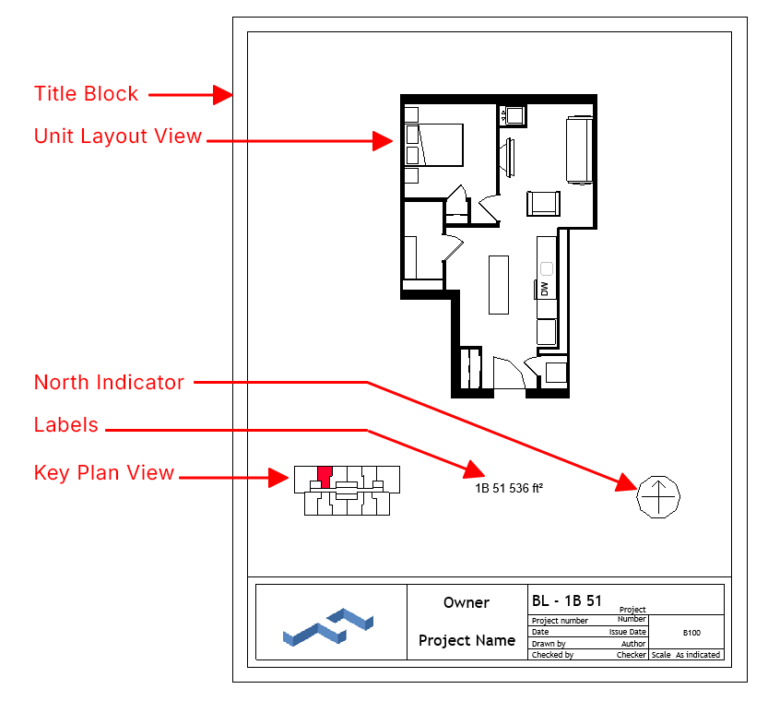
In Revit, a Marketing Plan sheet is composed of several key components:
Title Block: The title block is typically dedicated to marketing drawings. It includes the unit view, key plan, and project details such as unit name, area, and notes. Each sheet usually presents a single unit.
The Unit Layout: The main floor plan view of the unit. It shows room layout, furniture (optional), and labels with clear linework and simplified graphics suitable for presentation.
The Key Plan: Displays the overall floor plan of the building, highlighting the location and position of the specific unit. This helps viewers understand where the unit is situated within the project.
Labels: Include essential information such as the unit name, area, number of bedrooms, or other project details. Labels are typically placed in consistent positions for all sheets.
North Indicator: Shows the north direction for orientation and indicates how the unit relates to sunlight and view. For example, a south-facing unit will receive more daylight exposure.
How Marketing Plans Work
AgileForm Marketing Plans generates Revit sheets using your firm’s title block and automatically places key components on each sheet.
For each selected unit, the tool creates a dedicated sheet and places the following:
- Layout view of the unit with an assigned View Template
- Key plan highlighting the unit location within the floor
- North arrow to indicate orientation and daylight exposure
- Custom labels for unit information
- Area parameters such as unit name and calculated area
This approach ensures consistent, presentation-ready Marketing Plans while minimizing manual setup in Revit.
Continue to the next article to get started.