

Knowledge Base
-
Shadow Colour for SketchUp®
-
Shadow Colour for Autodesk® Revit®
-
Planary for Autodesk® Revit®
-
Planary for Autodesk® AutoCAD®
-
Account Management
-
Changelog
-
Marketing Plans for Autodesk® Revit®
Save and Open Settings
Marketing Plans allows you to save and open settings files.
This helps maintain office standards, reduces setup time, and allows you to continue working at a later stage.
Settings Files Contain:
Design Layout:
- All sheet components and their properties
- Marketing Plans retrieves and assigns any parameters defined in the Revit project
Area List:
- All selected areas from the Revit project are saved
- If an area no longer exists in the Revit model, it will need to be selected again.
Saving Settings
To save the current settings:
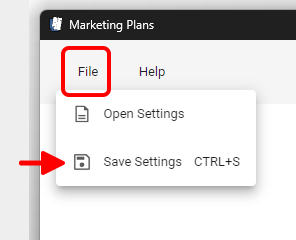
- Go to File and select Save Settings.
- Choose a folder and save the settings file. You can also use Ctrl + S as a shortcut.
Opening Saved Settings
To open a previously saved settings file:
- Go to File and select Open Settings.
- Browse to the saved settings file and open it.
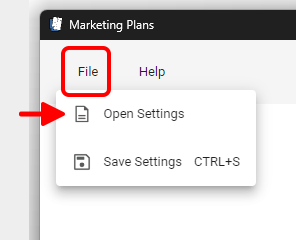
Table of Contents